Function
|
Description
|
Input
|
Output
|
Seatbelt Reminder
(Europe)
|
|
| – |
Seat Belt Indicator On until belt on
|
|
|
|
| – |
Seat Belt Indicator On for 6 sec.
|
|
| – |
IGN On & Vehicle Speed > 9km/h while belt off,
|
|
| – |
Seat Belt Indicator blinking
|
|
| – |
IGN On & Vehicle Speed > 20km/h while belt off,
|
|
| – |
Seat Belt Indicator blinking and buzzer warning starting
|
|
| – |
When IGN On & Vehicle Speed > 20km/h while belt on, belt off
|
|
| – |
Seat Belt Indicator blinking and buzzer warning starting
|
|
| – |
When Vehicle Speed > 20km/h & belt Off and Seatbelt Indicator
Blinking and buzzer warning, belt On,
|
|
| – |
Seat Belt Indicator Off and Buzzer Off
|
|
Rear Seatbelt Reminder
(Europe)
|
| – |
IGN on while rear seat belt off
|
|
| – |
Rear Seat Belt Indicator On
|
|
| – |
Alternator On and Rear Seat Belt Off
|
|
| – |
Rear Seat Belt Indicator On for 35 sec. after that Indicator
turn off
|
|
| – |
Alternator On and Rear Seat belt off → 35 sec → Vehicle Speed
> 20km/h
|
|
| – |
Rear Seat Belt Indicator On for 35 sec. again
|
|
| – |
Vehicle Speed >20km/h & Rear Seat belt [On → Off]
|
|
| – |
Rear Seat Belt Indicator Blinking and Buzzer warning starting
|
|
Parking Start Warnig]
|
| – |
IGN1 On & Parking Brake switch On & Vehicle Speed > 5km/h
|
|
| – |
Parking Brake Warning Starting
|
|
Sunroof Warning
|
| – |
Key Off & Driver side Door Open & Sunroof Open
|
|
| – |
Sunroof Warning Starting
|
|
Ice Warning
|
| – |
IGN2 On & Outside Temperature < 4 Celsius
|
|
|
RPAS Warning
|
| – |
Gear Position R and PAS Sensors detecting warning,
|
|
| – |
PAS Warning Starting according to warning level from PAS Sensors
|
|
SMK Warning
|
| – |
SMK sends warning messages such asIDOUT WNG,ESCL Not locked
Warning,ESCL Not Unlocked Warning,SSB Warning,
|
|
| – |
Buzzer warning Starting according to SMK Warning Message
|
|
Rear Defogger Front Deicer
|
| – |
IGN1 On & Alternator On & Defogger switch On,
|
|
| – |
Defogger On & Deicer On for 20 min.
|
|
Power Window
|
|
| – |
Power Window enable all the time
|
|
|
|
| – |
30sec. After IGN 1 turned off, Power Window disable
|
|
| – |
less than 30 sec. after IGN1 turned off, and Driver Door Open
|
|
| – |
Power window disable immediately
|
|
Tail Lamp Auto Cut
|
| – |
Key In & Tail switch On → Key Off → Driver Door Open
|
|
|
| – |
key In & Tail switch On → Key Off → Driver Door Open → Tail
switch Off → Tail switch On
|
|
|
EC DRL
|
| – |
IGN2 On & Alternator On and DRP Option On & Tail switch Off,
|
|
|
| – |
IGN2 On & Alternator On and DRP Option On & Tail switch Off
→ Tail switch On,
|
|
|
| – |
IGN2 On & Alternator On and DRP Option On & Tail switch Off
→ IGN2 Off,
|
|
|
Auto Light
|
| – |
IGN1 On & Auto light switch On with day light condition
|
|
| – |
Tail lamp Off, Head Lamp Off
|
|
| – |
IGN1 On & Auto light switch On with night light condition
|
|
| – |
Tail lamp On, Head Lamp On
|
|
| – |
IGN1 on & Auto light switch on with day light condition → night
light condition
|
|
| – |
2.5sec. after sensing night light condition, Tail lamp On and
Head Lamp On
|
|
| – |
IGN1 on & Auto light switch on with night light condition →
day light condition
|
|
| – |
5sec. after sensing day light condition, Tail lamp Off and Head
Lamp Off
|
|
Front Fog Lamp
|
| – |
Front Fog switch On when IGN2 On & Tail lamp On
|
|
|
Rear Fog Lamp
|
| – |
Rear Fog switch On when IGN2 On & Tail Lamp On & Front Fog Lamp
On
|
|
|
| – |
Rear Fog switch On when IGN2 On & Tail Lamp On & Head lamp On
|
|
|
Room Lamp
|
|
| – |
Room Lamp On for 20min.
|
|
| – |
All Door Closed & Key [On → Off] & Any Door Unlock,
|
|
| – |
Room Lamp On for 30sec.
|
|
| – |
All Door Closed & Key [On → Off] & All Door Lock,
|
|
|
|
|
| – |
Room Lamp On for 30sec.
|
|
| – |
Tx Lock while Room Lamp On,
|
|
|
Head Lamp
|
| – |
IGN2 On & Head Lamp switch On,
|
|
|
Escort
|
| – |
IGN2 On, Head Lamp switch On → IGN Off,
|
|
| – |
Head Lamp On for 20 min.
|
|
| – |
IGN2 On, Head Lamp switch On → IGN Off → Driver Door Open →
Drive Door Close,
|
|
| – |
Head Lamp On for 30 sec.
|
|
Static Bending Lamp
|
| – |
IGN2 On & Head Lamp switch On & Vehicle Speed <10 km/h & Steering
wheel Angle >100 degree,
|
|
| – |
Static Bending Lamp On according to its clockwise rotation Clockwise
→ Left Static Bending Lamp On, Count clockwise → Right Static
Bending Lamp On
|
|
| – |
IGN2 On & Head Lamp switch On & Vehicle Speed <10 km/h & Gear
Position [R] & Steering wheel Angle >100 degree
|
|
| – |
Opposite side of Static Bending Lamp On Clockwise → Right Static
Bending Lamp On, Count clockwise → Left Static Bending Lamp
On
|
|
| – |
Static Bending Lamps are controlled by the complicated calculation
between Vehicle Speed and Steering wheel AngleTo see more detail,
refer to “Head lamp” system.
|
|
|
Head Lamp Welcome
|
| – |
Head Lamp switch On & All Door Closed & All Door Locked & Key
Off & TX Unlock ,
|
|
| – |
Head Lamp On & Tail lamp On for 15 sec.
|
|
| – |
Head Lamp switch On & All Door Closed & All Door Locked & Key
Off & TX Unlock → TX Lock before 15 sec timer expired,
|
|
| – |
Head Lamp Off just after TX Lock
|
|
| – |
Auto light switch On & night light condition & All Door Closed
& All Door Locked & Key Off & TX Unlock ,
|
|
| – |
Head Lamp On & Tail lamp On for 15 sec.
|
|
EC Unlock
|
| – |
Key Off & Any Door Open & Central switch Lock switch On,
|
|
|
| – |
Key Off & Any Door Open & Tx Lock,
|
|
|
Key Reminder
|
| – |
Key On & Driver/Assist door Open & Central switch Lock switch
On,
|
|
| – |
All Door Unlock. If knob keeps being in lock, BCM retries unlock
3 times
|
|
| – |
Key On & Driver/Assist Door Open & Driver/Assist Knob changes
unlock → lock
|
|
| – |
All Door Unlock. If knob keeps being in lock, BCM retries unlock
3 times
|
|
Passive Reminder
|
| – |
Passive Reminder signal received from SMK
|
|
| – |
All Door Unlock and Buzzer warning starts
|
|
Crass Unlock
|
| – |
Key On & Crash Signal received,
|
|
| – |
All Door Unlock for 5 sec.
|
|
Speed Sensing
Auto door Lock
|
| – |
IGN1 On & Alternator On & Any Door Unlock & Vehicle Speed >15km/h,
|
|
|
| – |
IGN1 On & Alternator On & Vehicle Speed >15km/h & All Door Lock
→ Any Door unlock,
|
|
|
Shift-Lever
Auto door Lock
|
| – |
IGN1 On & Alternator On & Shift-Lever Position [R] → not [R],
|
|
|
Key Off
Auto Door Unlock
|
| – |
Any Door Lock & Key [In] → [Off]
|
|
|
Shift-Lever
Auto door Unlock
|
| – |
IGN1 On & Alternator On & Shift-Lever Position not [R] → [R],
|
|
|
Navi Wake up
|
| – |
Key Out & Tx Unlock/Passive Unlock received,
|
|
| – |
Navigation Wakeup Signal sends
|
| – |
No re-send within 1 min.
|
|
Tail Gate Release
|
| – |
All Door Unlock & Tail Gate Open switch On,
|
|
|
| – |
Passive Tailgate signal received,
|
|
|
Antitheft
|
| – |
All Door Closed & Key Off & Tx Lock & All Door Closed,
|
|
| – |
Arm after 30 sec. without any interrupts
|
|
| – |
[Arm state] Door open without Tx unlock/Passive Unlock signal
|
|
| – |
Horn activates, Hazard lamp blinks
|
|

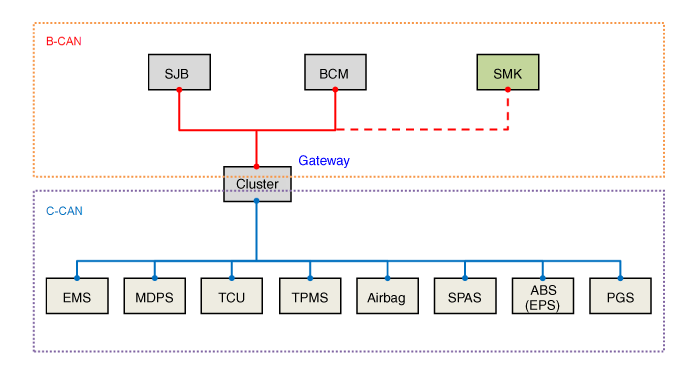
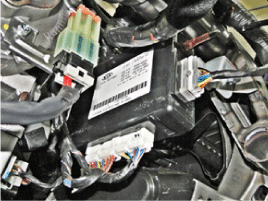
 Schematic diagrams
 Repair procedures